

What “Tenant” Means in WordPress Hosting
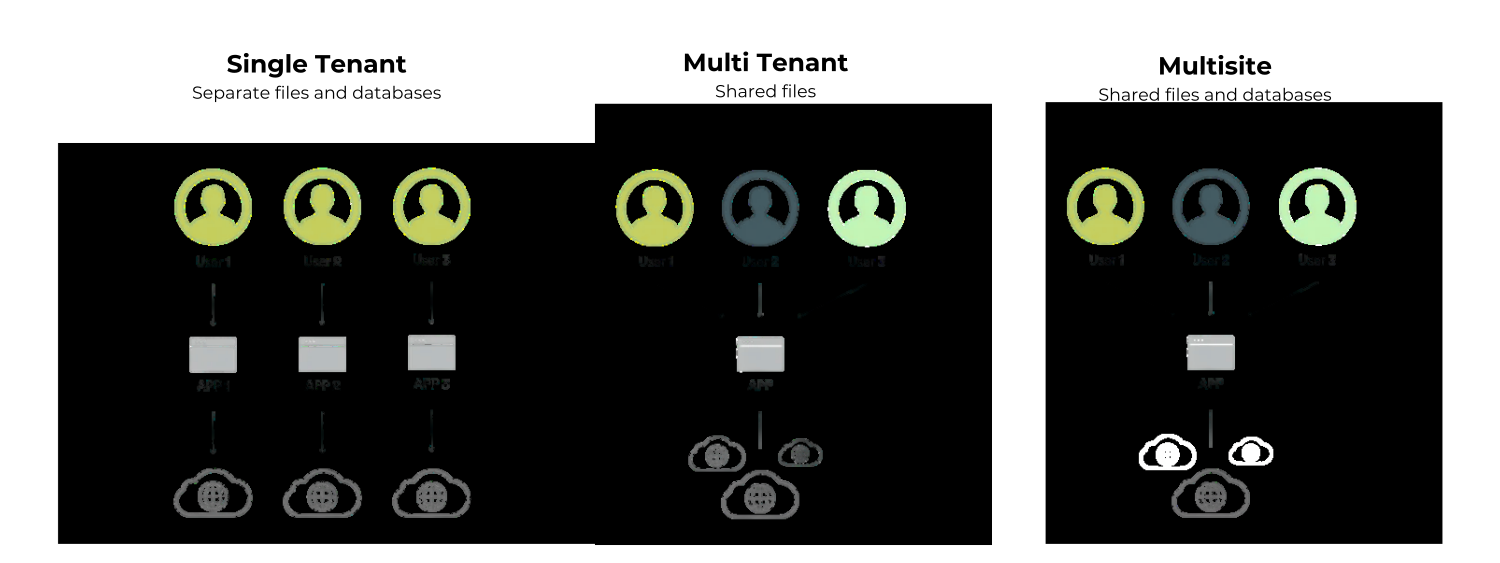
In hosting and SaaS, a tenant is a customer or website environment that runs on shared infrastructure, often alongside many other tenants. What changes between single tenant, multi‑tenant, and multisite is how much of the underlying stack each tenant shares with others.
- Single tenant: every website has its own isolated environment, with its own WordPress installation, database, and resources.
- Multi‑tenant: many sites share the same application stack and servers, with logical separation mainly at the data level.
- Multisite: a special WordPress feature where one WordPress installation powers many sites within a “network”, sharing core files and a single database.
What Is Single Tenant WordPress?
In a single‑tenant WordPress architecture, each site runs in its own dedicated environment: separate files, a separate database, and dedicated server resources. AreaWP is built around this model, so every deployed site behaves like its own isolated “mini server” instead of just another site on a large shared network.
How Single Tenant Works with AreaWP
AreaWP Server Management provisions a fully isolated WordPress instance for each tenant, with automated setup of the stack (web server, PHP, database, caching) and infrastructure‑level security. It combines orchestration, MainWP integration, billing, and WaaS tooling so you can manage many single‑tenant sites from one unified platform.
- One independent WordPress installation per client/site, with its own database and file system.
- Per‑site resource limits (CPU, RAM, storage) and scaling rules, especially in AreaWP’s hosted edition.
- Per‑site configuration for PHP, caching, and services without impacting other tenants.
- Central management of all these sites via the AreaWP dashboard, automation, and MainWP integration.
Benefits of Single Tenant for Agencies and WaaS
1. Strong Isolation and Security
Single‑tenant environments deliver strong isolation: if one site is compromised or misconfigured, it does not automatically endanger others because there is no shared database or multisite network. This isolation helps agencies and SaaS providers meet stricter security and compliance requirements, since each tenant’s data and stack are more clearly separated.
2. Predictable Performance Without “Noisy Neighbors”
In single‑tenant WordPress, each tenant has dedicated resources, so a traffic spike or heavy plugin on one site cannot slow down other sites. AreaWP can automatically adjust server resources per tenant, matching CPU/RAM to the load of that specific site for more consistent performance.
3. Full Per‑Site Customization
Because each installation is isolated, you can safely implement different PHP versions, caching strategies, plugins, themes, and even custom code per tenant without affecting the rest of your portfolio. AreaWP keeps management unified by combining these single‑tenant sites with MainWP‑powered bulk tasks, templates, and automation.
4. Better Risk Management and SLAs
Single‑tenant WordPress limits risk to the specific client site where changes occur, instead of exposing the entire network to one bad update or custom plugin. This makes it easier to offer premium service plans, strict uptime guarantees, and performance SLAs because the potential impact of issues is dramatically reduced.
What Is Multi‑Tenant WordPress?
In a multi‑tenant WordPress platform, multiple customer sites share a common application stack and infrastructure, with separation happening mainly at the database or schema level. This design can improve resource utilization and lower hosting costs per tenant, but it reduces isolation and increases shared risk.
- One shared stack (codebase, servers) powers many tenants.
- Platform‑level bugs, outages, or security incidents can affect every tenant at once.
- Updates and changes must be coordinated carefully because a mistake propagates across all tenants.
- Per‑tenant customization is limited by what the shared platform supports.
Multi‑tenant platforms are attractive when pure cost and density are the top priorities, but for mission‑critical or higher value WordPress projects, the shared‑risk model can become a liability.
What Is WordPress Multisite?
WordPress multisite is a core feature that lets one WordPress installation and one database serve many different sites in a network, each with its own dashboard and settings. It is popular for universities, news networks, and organizations that run many closely related sites from a single central team.
- One core installation and shared database with table prefixes for each site.
- Centralized updates and network‑wide management of themes and plugins.
- Limited per‑site freedom; some plugins and changes must be applied network‑wide.
- Database and file sharing increase the impact of network‑level bugs or security issues.
Multisite works well when sites are strongly related and managed in a uniform way, but it becomes restrictive when you need very different stacks, resources, or growth paths for each client.
Why Single Tenant Is the Best Architecture for Serious WordPress Businesses
For agencies, WaaS platforms, and businesses that sell ongoing care plans or productized WordPress services, single tenant creates the most robust foundation. AreaWP WaaS Platform Builder amplifies these advantages by providing infrastructure automation and business tooling to launch and manage many isolated WordPress environments at scale.
Safer Growth and Fewer Platform‑Wide Incidents
In single‑tenant setups, a broken update, rogue plugin, or custom code error is localized to the specific tenant where it occurs instead of taking down your entire portfolio. In multi‑tenant and multisite setups, the same type of incident can impact every customer on that shared infrastructure, which is a much higher business risk.
More Monetization Options (Plans, Add‑Ons, and Upgrades)
With single tenant and AreaWP, you can design different plans and upsells per tenant—such as resource tiers, premium plugins, priority support, and advanced backups—because each site has its own environment and limits. You can explore options on the AreaWP pricing page, and adapt them to your own business model.
Hosted or Self‑Hosted, Same Single‑Tenant Model
AreaWP offers both a hosted edition and a self‑hosted option that you can run on your own infrastructure, while keeping the same single‑tenant architecture and management experience. The AreaWP documentation explains how to configure environments, branding, and roles to match your stack and workflow.
Single Tenant vs Multi‑Tenant vs Multisite: Quick Comparison
| Aspect | Single tenant (AreaWP) | Multi‑tenant WordPress | WordPress multisite |
|---|---|---|---|
| Infrastructure | Dedicated environment per site, with its own WordPress, database, and files. | Shared application stack; many tenants share servers and codebase. | One WordPress install and database powering many sites in a network. |
| Security & isolation | Highest isolation; issues are contained to a single tenant. | Higher cross‑tenant risk if the shared platform is compromised. | Network‑level exploits or corruption can affect all sites. |
| Performance | Predictable, no noisy neighbors; per‑site autoscaling is possible with the right stack. | Efficient resource usage, but performance can fluctuate across tenants. | Heavy sites can slow down the entire network. |
| Customization | Full per‑site flexibility: plugins, themes, PHP versions, caches, services. | Limited by what the shared platform supports for all tenants. | Network‑wide theme and plugin choices limit what each site can do. |
| Management | Centralized via AreaWP and tools like MainWP, but each installation remains independent. | Centralized at the platform level, but updates are complex to coordinate safely. | Centralized updates; simple but less granular control for individual sites. |
| Risk profile | Localized risk; easier to contain and resolve incidents per tenant. | Shared risk; a single bug can affect many tenants at once. | Single point of failure for all sites in the network. |
| Ideal use cases | Agencies, WaaS, high‑value clients, regulated sectors, performance‑sensitive projects. | Cost‑sensitive SaaS products with lighter isolation requirements. | Organizations with many related sites managed by one central team. |
Build on Single Tenant WordPress with AreaWP
If you are planning a scalable WordPress business—whether it is an agency, WaaS product, or SaaS built on WordPress—a single‑tenant architecture gives you a safer, more flexible foundation than multi‑tenant or multisite. AreaWP turns that architecture into a complete platform, combining isolated WordPress environments with centralized management, automation, and billing so you can grow without sacrificing stability or control.